SYNC MUSHROOM
Operate MT5 from your TradingView screen.
Manual execution. Local bridge. No cloud order relay.
The Gap Between Analysis and Execution
TradingView analysis and MT5 execution should not break the flow. Switching between charting tools and execution terminals introduces small but constant interruptions, creating friction during manual operation.
Separated Environments
Each time you switch from TradingView to MT5, your analytical focus is momentarily disrupted.
Physical Friction
Moving the cursor and activating windows to place an order adds unnecessary physical steps.
Slower Manual Response
Those extra steps can slow the moment between deciding to act and initiating the order.
Keep TradingView Open.
Execute Through Your Local MT5.
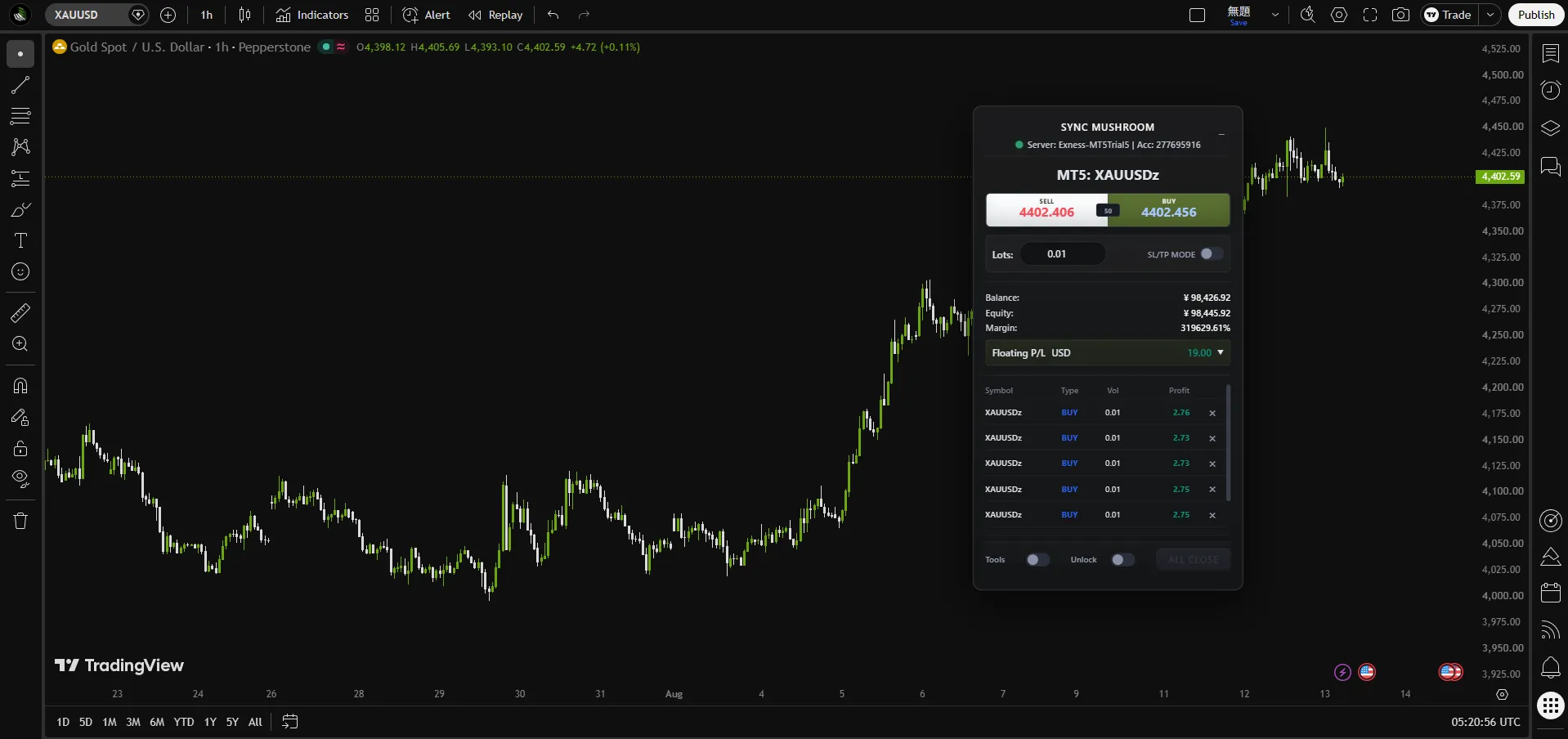
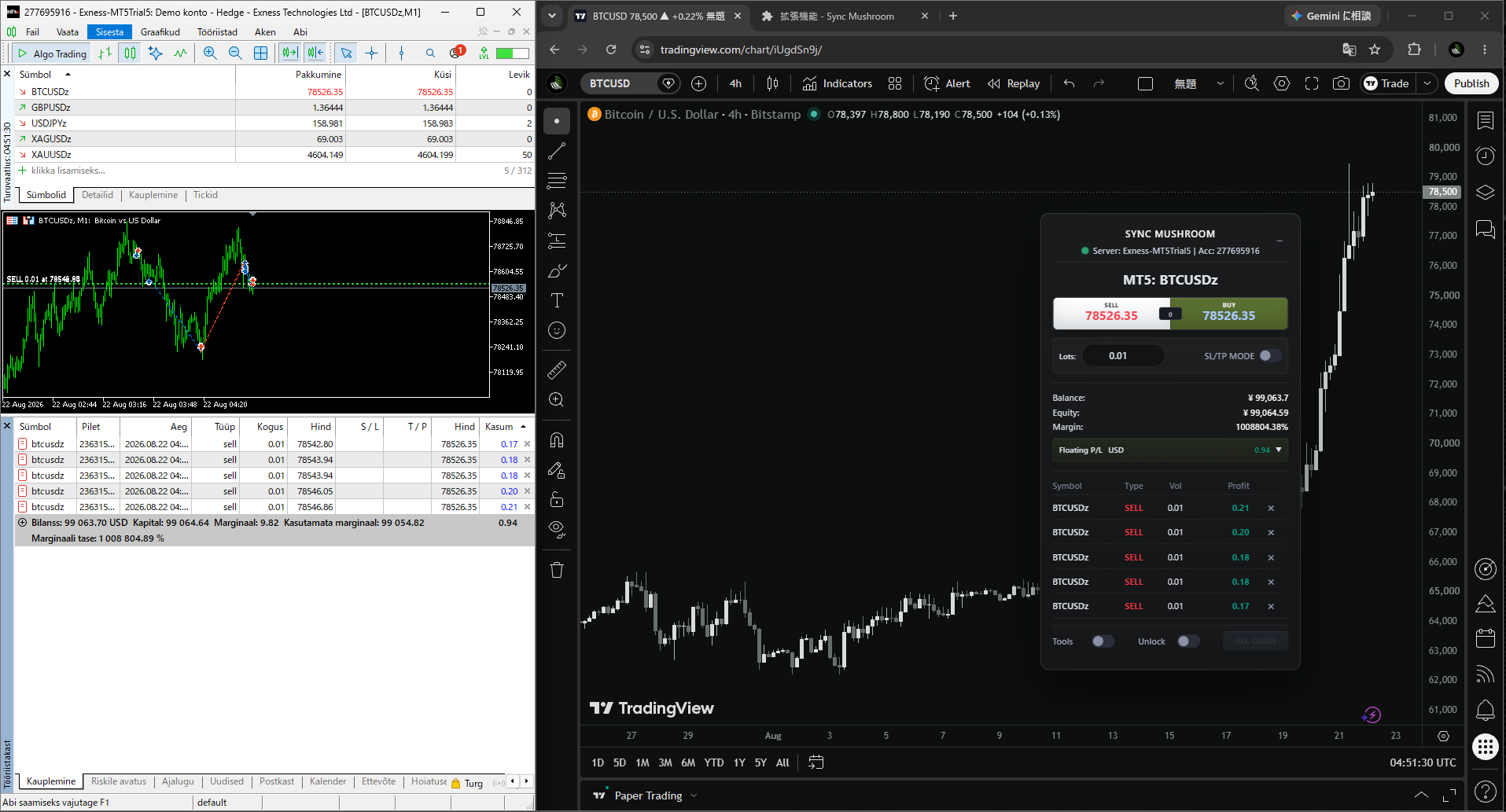
Sync Mushroom places manual MT5 controls on your TradingView screen and passes user-initiated order commands through a local bridge to your own MT5 terminal. Your trading decisions remain yours; MT5 remains the execution engine.
Technical Features
Manual order control, a local MT5 bridge, and execution-path evidence.

Manual Order Control in TradingView
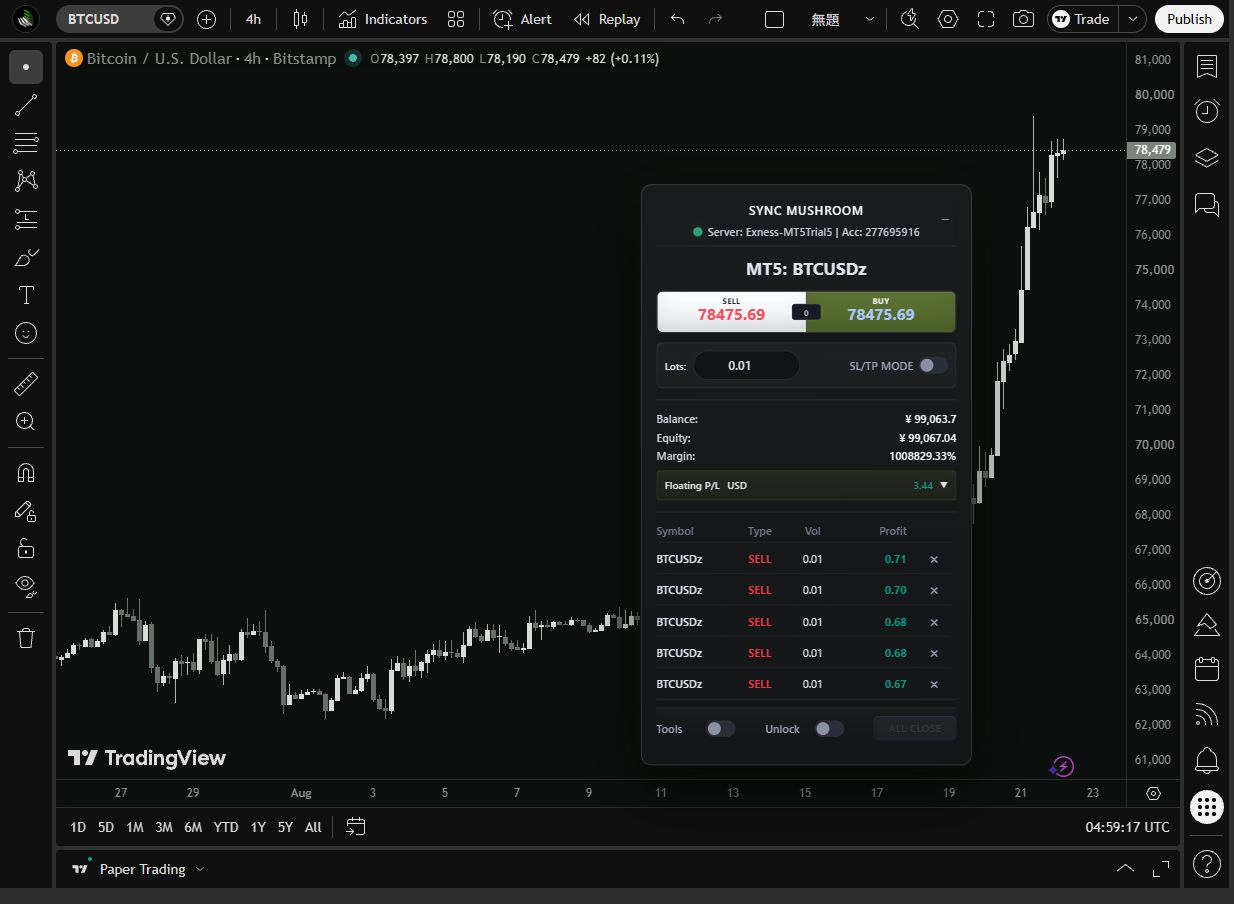
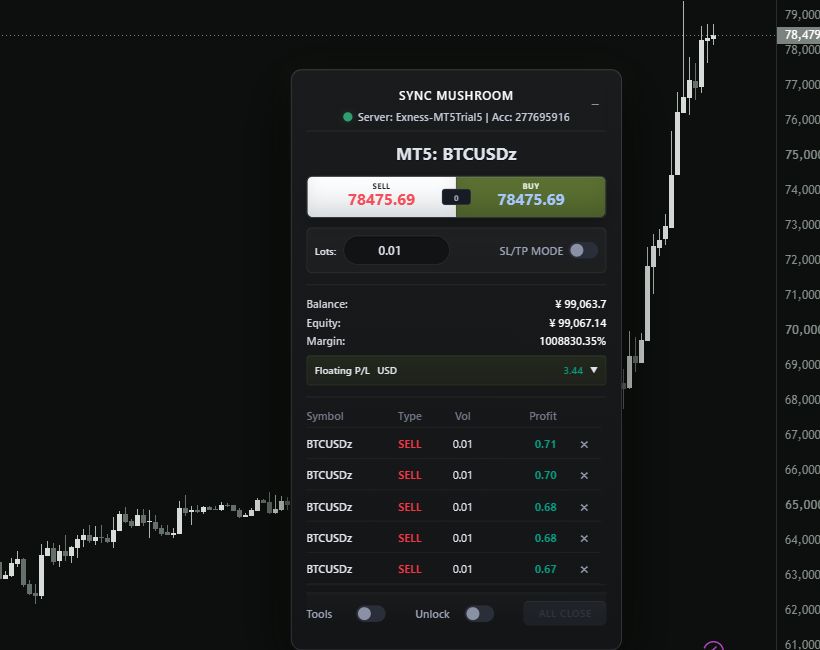
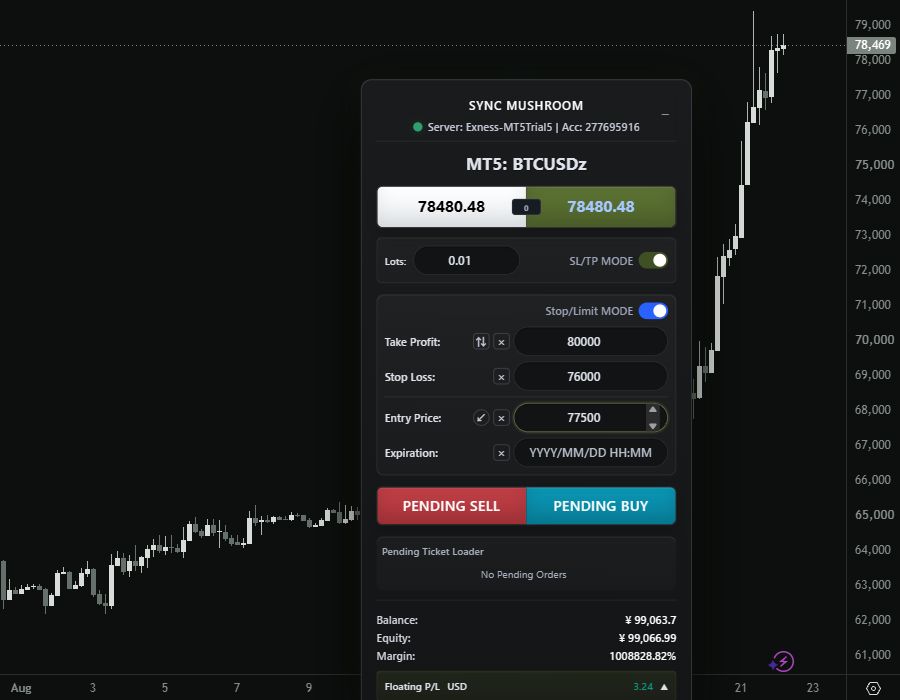
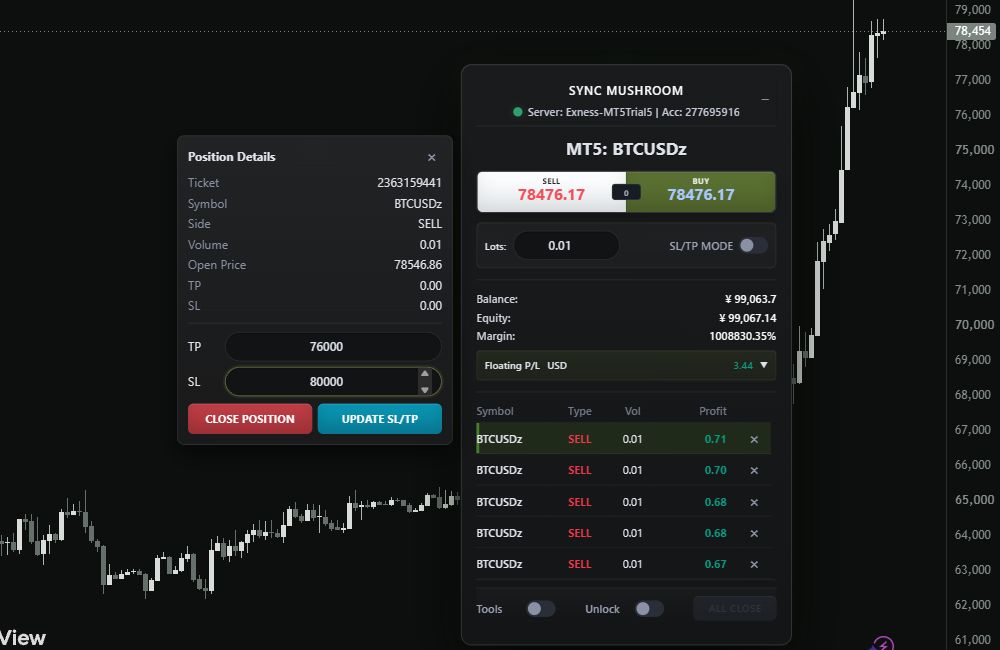
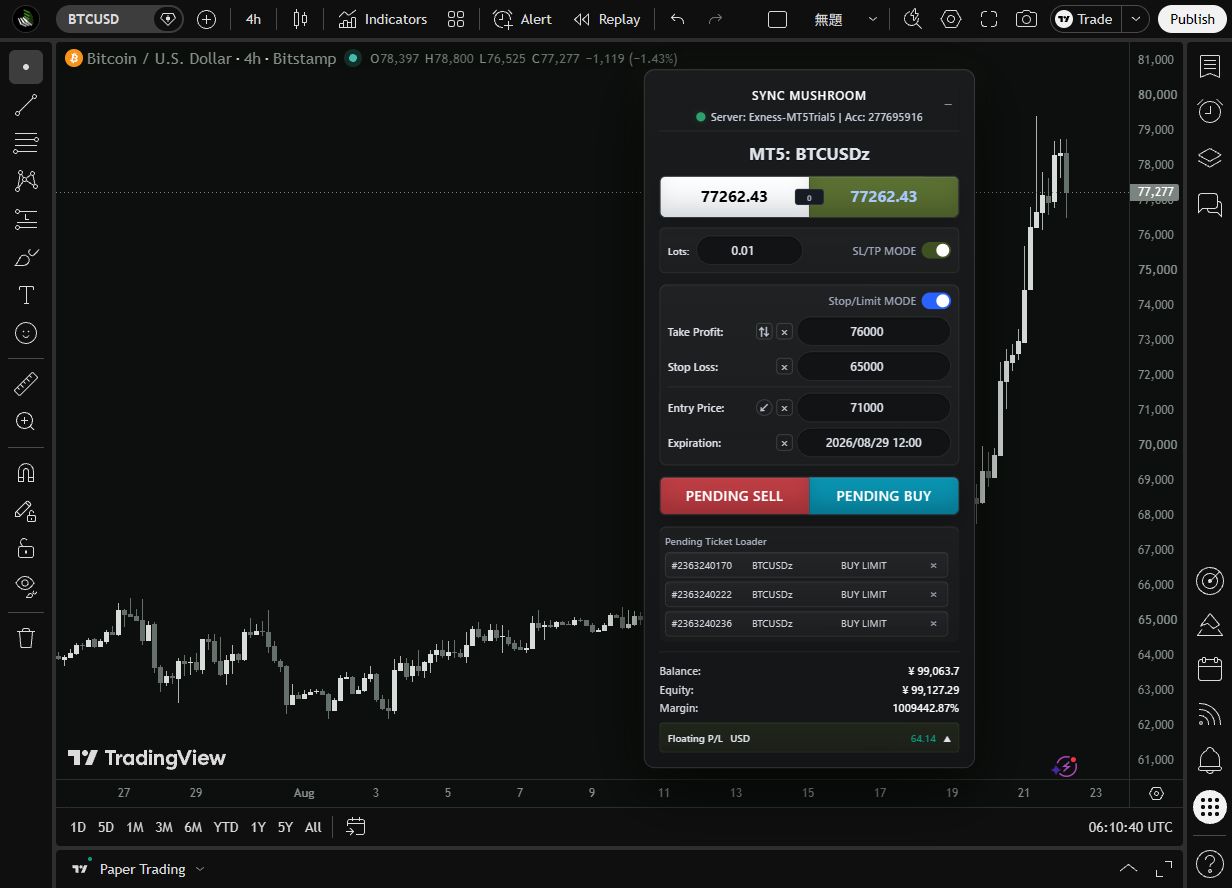
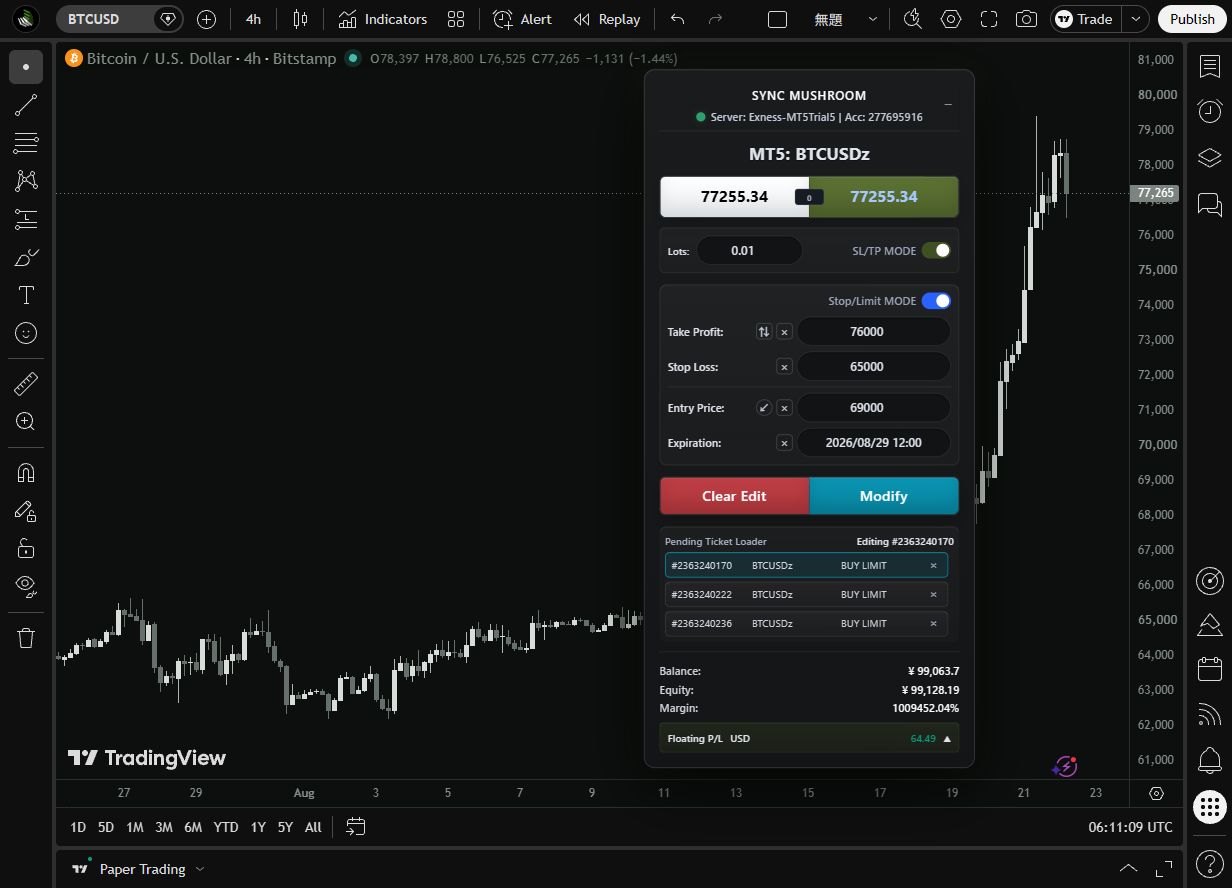
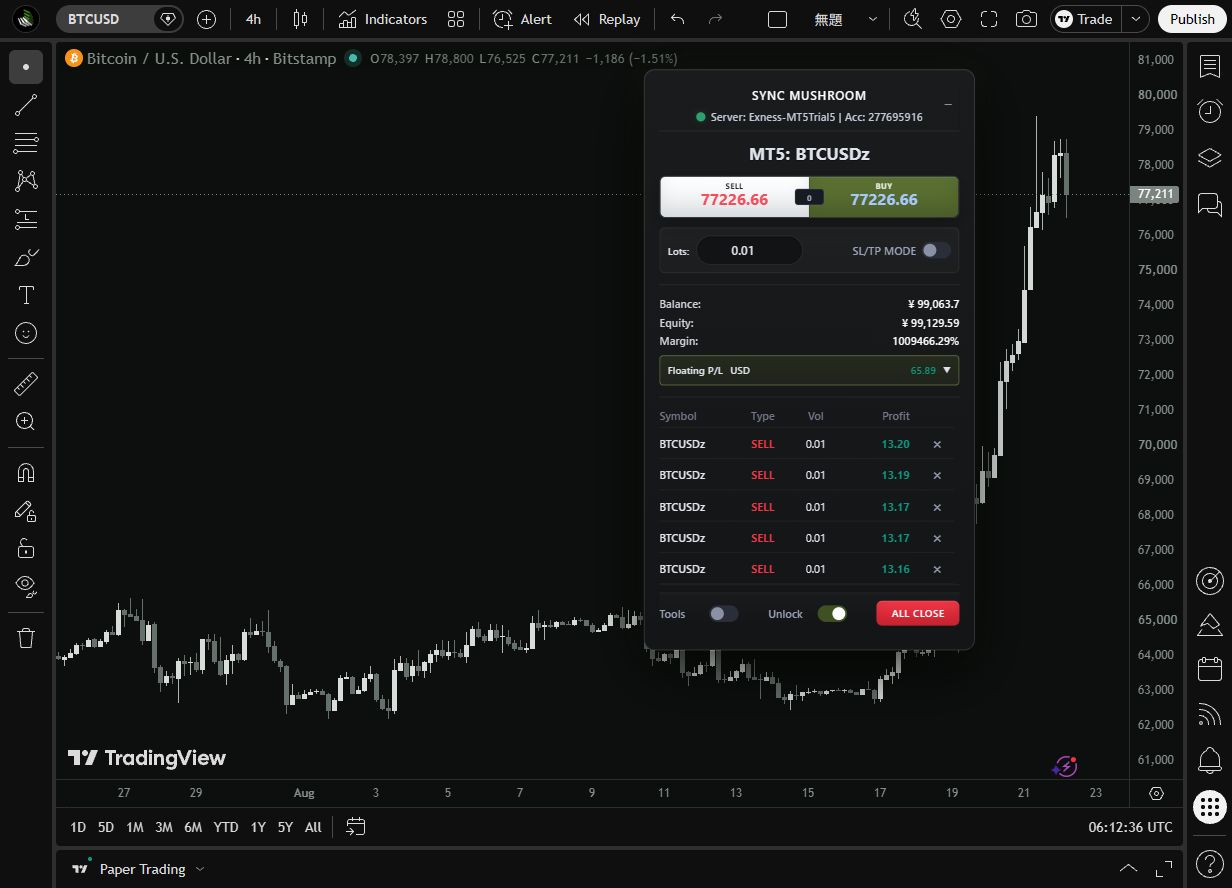
Use the embedded Sync Mushroom panel to initiate market BUY and SELL orders, work with actual MT5 pending orders, modify positions, and use individual Close or ALL CLOSE without leaving your TradingView chart. Actual pending orders are represented as Native Drawings and are handled through the independent Pending panel; deleting a drawing is not an MT5 cancel command.

Local Handoff to Your MT5
User-initiated order commands pass locally from the Sync Mushroom panel through the local Bridge to MT5 on the same Windows PC. MT5 remains the execution engine and communicates with your broker; the order path does not use an external cloud relay. Compatible MT5 broker environments can also be used when they are not available through TradingView’s official broker connections.
Execution-Path Evidence
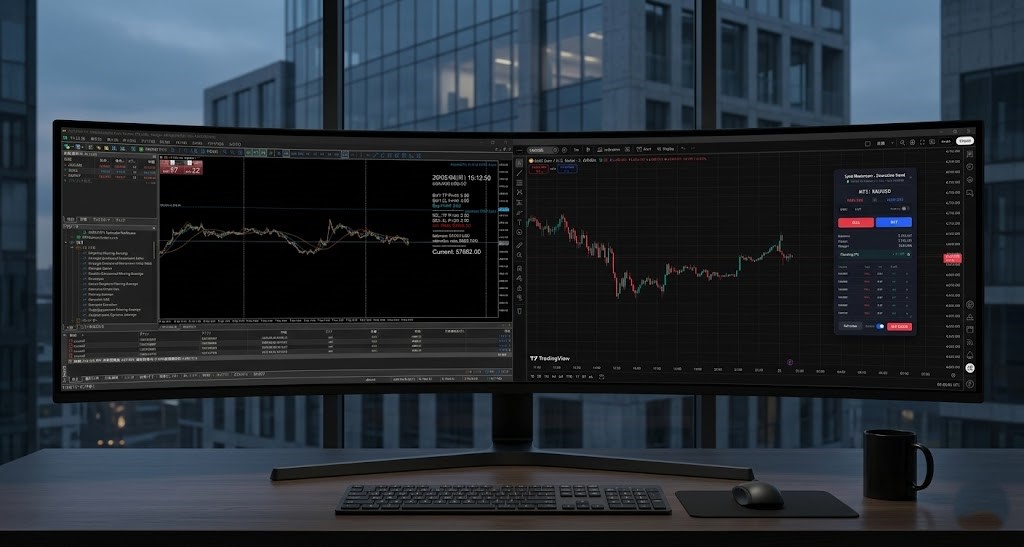
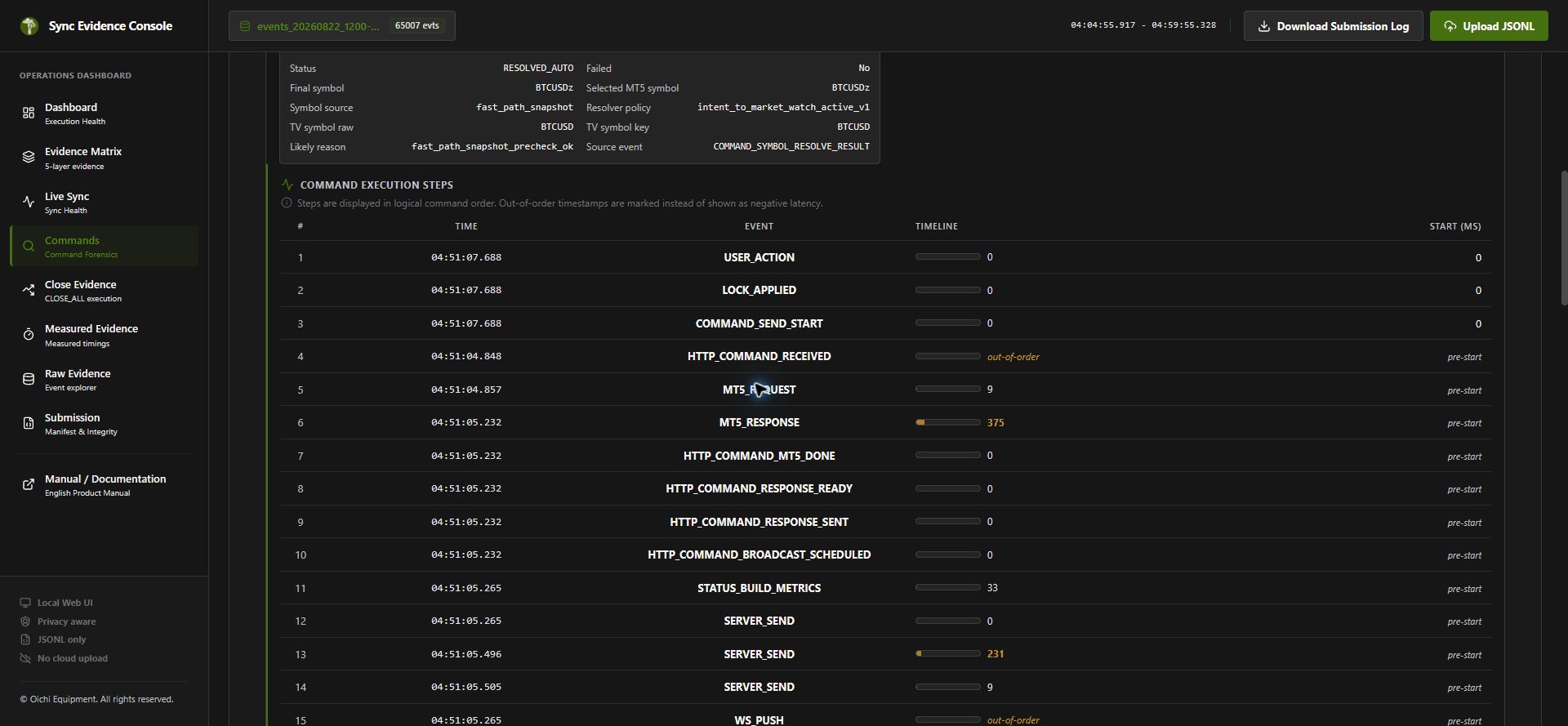
Sync Evidence Console is the separate companion app included with Sync Mushroom. Load local JSONL logs to review command flow, MT5 request and response records, result codes, measured timing by processing stage, synchronization, and related execution evidence. It does not place orders or determine root cause or responsibility by itself.
Interface
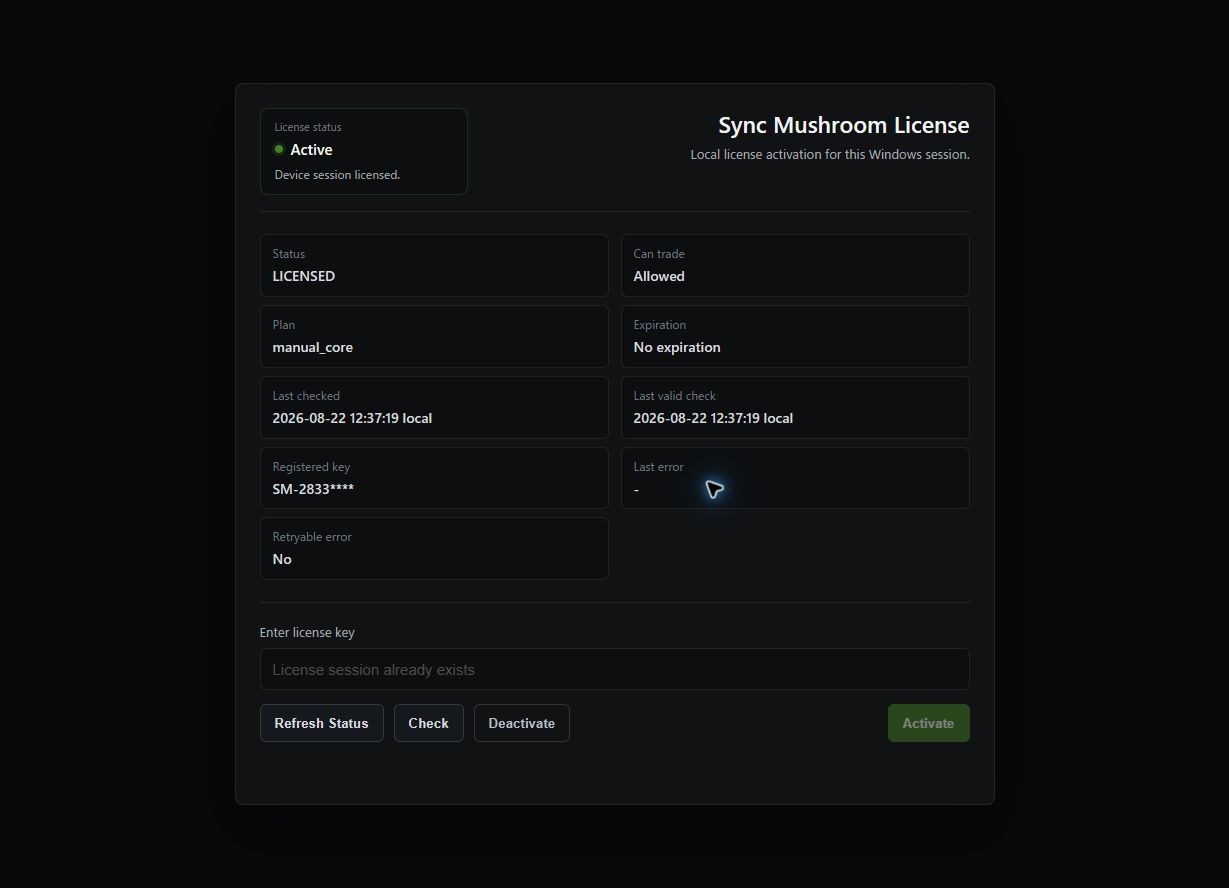
Manual controls on the chart. Execution evidence in a separate local console.
FAQ
No. Sync Mushroom does not make trading decisions, generate trading signals, run automated trading strategies, or autonomously initiate trade orders. Trading decisions and order initiation remain user-controlled.
No. Sync Mushroom does not route order commands through a public webhook URL or external cloud relay. The command path from the Sync Mushroom panel through the Local Bridge to your MT5 terminal remains local to the Windows PC. TradingView, MT5, and license verification still require internet connectivity.
The supported environment requires Windows 11, TradingView Web, the Sync Mushroom extension and Local Bridge, and one MT5 terminal running on the same Windows PC. Google Chrome is recommended and primarily tested. Edge and Brave are compatible Chromium options, but validation may vary by release. Other Chromium browsers may be used as Custom Chromium and are not individually validated. TradingView Desktop and MT4 are not supported.
Yes, where the MT5 environment is compatible. Sync Mushroom uses your own local MT5 terminal as the execution target, so the broker environment does not need to be available as a TradingView official broker connection. Compatibility is not guaranteed for every broker, account type, instrument, or order condition.
No. The 14-Day Free Trial does not require a payment method, does not automatically convert to a paid license, and does not trigger an automatic charge when it ends. If you want to continue, you choose and purchase a paid fixed-term license yourself.
No. Paid licenses are fixed-term one-time purchases with no recurring billing or automatic renewal. If you want to continue, you manually purchase another term. If your current term is still active, the new term is added after its existing end date.
Getting Started
License Options
Paid licenses are fixed-term one-time purchases with no recurring billing or automatic renewal. Payments are handled through an external checkout provider.
Please review before proceeding to checkout.
Please read the following information before starting the 14-Day Free Trial or purchasing a Sync Mushroom license.
This page explains the supported environment, local execution model, licensing, updates, and support policy so you know what to expect before proceeding.
1. Is Sync Mushroom Right for You?
Sync Mushroom is designed for traders who:
- Analyze markets in TradingView Web and make their own trading decisions.
- Execute orders through MetaTrader 5.
- Want manual MT5 controls available from the TradingView chart while keeping order initiation user-controlled.
- Use a supported Windows 11 desktop environment.
2. Who It Is NOT Designed For
Sync Mushroom is not intended for users who are looking for:
- Automated trading strategies or Expert Advisors (EAs)
- Webhook- or alert-driven automatic order execution
- TradingView Desktop
- Mobile-only trading
- MetaTrader 4 compatibility
- Copy trading services
- Investment advice or trading signals
Sync Mushroom does not make trading decisions or autonomously initiate order actions.
3. System Requirements
The supported environment requires:
- Windows 11
- TradingView Web
- Google Chrome (recommended and primarily tested), Edge or Brave; other Chromium browsers are Custom Chromium and are not individually validated
- The Sync Mushroom Chrome Extension and Local Bridge
- One MetaTrader 5 terminal as the execution target on the same Windows PC
TradingView Desktop and MetaTrader 4 are not supported.
If multiple MT5 terminals are detected, Sync Mushroom blocks execution until a single execution target remains.
If MT5 has just updated or Sync Mushroom cannot safely confirm one ready MT5 target, execution remains blocked. Do not rely on a restart as a guaranteed recovery; manage urgent orders or positions directly in MT5 and review the current FAQ.
4. First Launch Security Notice
The order-command path from the Sync Mushroom panel through the Local Bridge to MT5 stays on your local Windows PC and is not routed through an external cloud order relay.
TradingView, MT5, and license verification still require internet connectivity.
Because Sync Mushroom is a downloaded desktop application that communicates locally with your browser and MetaTrader 5, Windows or your security software may display a confirmation dialog during the first launch.
Examples include:
- Windows SmartScreen
- Microsoft Defender
- Third-party antivirus software
These prompts are normal security checks performed by your operating system or security software. Sync Mushroom uses loopback-only local communication and does not require router port forwarding or a user-configured inbound firewall opening.
5. License
Using Sync Mushroom requires an active license, including during the 14-Day Free Trial.
The 14-Day Free Trial issues a Sync Mushroom license for 14 days. No payment method is required, and the trial does not automatically convert to a paid license or trigger an automatic charge.
Paid options are 30-Day, 1-Year, and 3-Year fixed-term licenses. Each is a one-time purchase with no recurring billing or automatic renewal.
A standard license supports up to 3 registered physical devices, with up to 2 active sessions at the same time.
When continuing an active license, the new paid term is added after the current end date. When there is no active access, the new term starts at the next Activate action or automatically 30 days after purchase if it has not been activated.
For 90 days after expiry, an eligible license remains Renewable and may continue with the same key. On day 91 it is Archived; a later purchase receives a new key.
The local License page handles Activate, Check, and End Session. License history, device management, recovery, continuation, and private downloads are handled in License Management.
Sync Mushroom and Sync Evidence Console are delivered together after license issuance. The extension is installed manually from the fixed product installation folder; Sync Evidence Console remains a separate application.
Please refer to the License Manual and Full FAQ for additional licensing details.
6. Updates
Sync Mushroom may receive updates during an active license period, including:
- New features
- Performance improvements
- Bug fixes
- Compatibility updates
Paid licenses include updates made available during the applicable license term.
7. Support Policy
Sync Mushroom is designed to be self-service.
Before requesting support, please review:
- User Manual
- FAQ
- Reference
- Sync Evidence Console Manual (when applicable)
If you encounter a legitimate product issue after reviewing the available documentation, evidence-based technical support is available for users with an active Sync Mushroom license.
Support is intended for product-related issues.
Examples of items outside the scope of support include:
- Trading strategies
- Investment advice
- Broker recommendations
- General Windows usage
- Basic TradingView operation
- Basic MetaTrader 5 operation
- PC troubleshooting unrelated to Sync Mushroom
When submitting a support request, you may be asked to provide information such as:
- Product version
- Description of the issue
- Steps to reproduce
- Submission Log from Sync Evidence Console (when applicable)
Providing sufficient information allows us to investigate issues more accurately.
8. Before Starting the Trial or Purchasing
Before proceeding, please make sure you understand the following:
- Your environment meets the supported system requirements.
- The order-command handoff to MT5 remains local, while TradingView, MT5, and license verification still require internet connectivity.
- The 14-Day Free Trial requires no payment method and does not automatically convert to a paid license or trigger an automatic charge.
- Paid licenses are fixed-term one-time purchases with no recurring billing or automatic renewal.
- A standard license supports up to 3 registered physical devices and up to 2 active sessions at the same time.
- First-launch security prompts may appear.
- You have reviewed the available documentation and understand the support policy.
Confirmation
After confirming, the 14-Day Free Trial and paid-license options will become available.
- ✓ Full access to all features
- ✓ Updates during the license term
- ✓ 1 user license
- ✓ Up to 3 registered devices
- ✓ Up to 2 active sessions simultaneously
- ✓ Full access to all features
- ✓ Updates during the license term
- ✓ 1 user license
- ✓ Up to 3 registered devices
- ✓ Up to 2 active sessions simultaneously
- ✓ Full access to all features
- ✓ Updates during the license term
- ✓ 1 user license
- ✓ Up to 3 registered devices
- ✓ Up to 2 active sessions simultaneously
Contact
For product, license, or technical support inquiries, please contact us at:
Compliance and Disclaimer
- - Sync Mushroom is a user-controlled local execution utility that places manual MT5 controls on TradingView Web and passes user-initiated order commands through a Local Bridge to MT5 on the same Windows PC.
- - Sync Mushroom does not provide financial advice, investment advice, trading signals, strategy recommendations, automated trading strategies, copy trading, brokerage, dealer or exchange services, custody, asset management, or investment performance services.
- - Sync Mushroom does not make trading decisions or autonomously initiate order actions on behalf of the user. Trading decisions and order initiation remain user-controlled.
- - MT5 remains the execution engine, and broker-side acceptance, rejection, fills, slippage, trading rules, and trading outcomes remain outside the control of Sync Mushroom.
These Terms of Service govern the use of Sync Mushroom provided by Oichi Equipment.
Sync Mushroom is a user-controlled local execution utility for manual MT5 operation from TradingView Web. It does not provide financial advice, trading signals, automated trading strategies, brokerage services, custody, asset management, or guaranteed trading outcomes.
Subject to these Terms and an active license, the user is granted a non-exclusive, non-transferable, single-user right to use Sync Mushroom during the applicable license term.
A standard license may be registered on up to 3 physical devices, with up to 2 active sessions at the same time.
The 14-Day Free Trial provides a 14-day Sync Mushroom license. No payment method is required, and the trial does not automatically convert to a paid license or trigger an automatic charge.
Paid options are 30-Day, 1-Year, and 3-Year fixed-term licenses. Each is a one-time purchase with no recurring billing or automatic renewal.
If a new paid term is added while the existing license is active, it begins after the current end date. If there is no active access, it begins at the next Activate action or automatically 30 days after purchase. An expired license remains Renewable for 90 days; on day 91 it is Archived and a later purchase receives a new key.
Trading decisions and order actions remain user-controlled. Sync Mushroom does not make trading decisions or autonomously initiate trade orders.
MT5 remains the execution engine. Broker-side acceptance, rejection, execution, fills, slippage, trading permissions, trading hours, margin requirements, and other broker conditions are outside the control of Sync Mushroom.
Sync Mushroom is intended for the supported environment described on this page and in the current documentation.
Users must not attempt to bypass license controls, share or transfer a license in violation of these Terms, interfere with the licensing or security mechanisms, or use the software in a manner that violates applicable law.
TradingView, MetaTrader 5, MetaQuotes, brokers, payment providers, and other referenced third-party products or services are operated by their respective providers.
Sync Mushroom is an independent OICHI EQUIPMENT product. References to third-party products or services do not by themselves indicate sponsorship, endorsement, or official affiliation.
OICHI EQUIPMENT may update or modify Sync Mushroom, its documentation, compatibility requirements, or service components where reasonably necessary for maintenance, security, compatibility, or product development.
Any modification, suspension, or discontinuation is subject to applicable law and any rights associated with an active paid license term.
Intellectual property rights in Sync Mushroom and OICHI EQUIPMENT's original software, documentation, and materials belong to OICHI EQUIPMENT or its licensors.
Third-party trademarks, software, services, and materials remain the property of their respective owners.
Paid licenses are fixed-term one-time purchases and do not create a recurring subscription.
Refunds, returns, and cancellations after purchase are not accepted except where required by applicable law or where the applicable merchant-of-record rules require otherwise.
No profit, win-rate, latency, execution-speed, fill, slippage, availability, broker-execution, or trading-result guarantee is provided.
Users remain responsible for reviewing the final order and position state in MT5 and for managing their own trading decisions and risk.
To the extent permitted by applicable law, OICHI EQUIPMENT is not responsible for losses resulting from market movements, broker decisions, third-party service failures, unsupported environments, user error, or other matters outside the reasonable control of Sync Mushroom.
Nothing in these Terms excludes or limits any right or liability that cannot lawfully be excluded or limited.
OICHI EQUIPMENT processes only the information reasonably necessary to provide licensing, purchase-related service operation, license recovery, security, and technical support for Sync Mushroom.
During normal trading operation, Sync Mushroom does not automatically send your MT5 account number, broker name, server name, trading symbols, order details, position information, or normal trading records to OICHI EQUIPMENT.
Those trading records remain in the local processing and logging environment unless you choose to share support material.
License activation and verification may use the license key, purchaser or registered email address where applicable, a physical-device token derived locally from Windows MachineGuid, license and entitlement status, and session or authentication-related information. Raw MachineGuid is never transmitted or stored; the service uses a protected derived value for device-limit and trial-abuse controls.
License verification is separate from the local trading-data path.
Paid checkout is processed through an external sales or payment provider. The provider may process payment and checkout information according to its own terms and privacy practices.
OICHI EQUIPMENT may receive information necessary to confirm a purchase and apply or manage the corresponding Sync Mushroom license entitlement.
If you contact support, you may choose to provide information such as the product version, issue description, reproduction steps, result or reason information, and a privacy-protected Sync Evidence Console Submission Log where appropriate.
Sync Evidence Console does not automatically send a Submission Log to OICHI EQUIPMENT. Submission material is shared only when the user chooses to provide it.
OICHI EQUIPMENT may use service providers for payment processing, email delivery, hosting, license verification, security, and related service operations.
Information is disclosed only as reasonably necessary for those services, legal obligations, protection against abuse or fraud, or other purposes permitted by applicable law.
Information may be used for license issuance and verification, entitlement management, license recovery, service operation, security, fraud and abuse prevention, purchase administration, and technical support.
Information is retained only for as long as reasonably necessary for the purposes described above, legal obligations, dispute handling, security, or legitimate record-keeping requirements.
Users may contact [email protected] regarding access, correction, deletion, or other applicable requests concerning their personal information.
Requests are handled subject to applicable law and legitimate retention requirements.
OICHI EQUIPMENT takes reasonable technical and organizational measures appropriate to the information and services being handled.
1-Year License — USD 540
3-Year License — USD 1,300
Paid licenses are fixed-term one-time purchases with no recurring billing or automatic renewal.
Paid Sync Mushroom licenses are fixed-term one-time purchases, so there is no recurring subscription to cancel.
Refunds, returns, and cancellations after purchase are not accepted except where required by applicable law or where the applicable merchant-of-record rules require otherwise.
Any payment-provider refund, partial-refund, or chargeback handling remains subject to the applicable provider rules. Review the current terms before purchasing.